




Create a Cinematic AI Poster with Real Emotions and Stunning Style in One Prompt
Learn how to generate a stunning 8K cinematic poster using one detailed AI prompt. Understand the meaning behind each line and discover tips to craft your own realistic, emotional AI images.
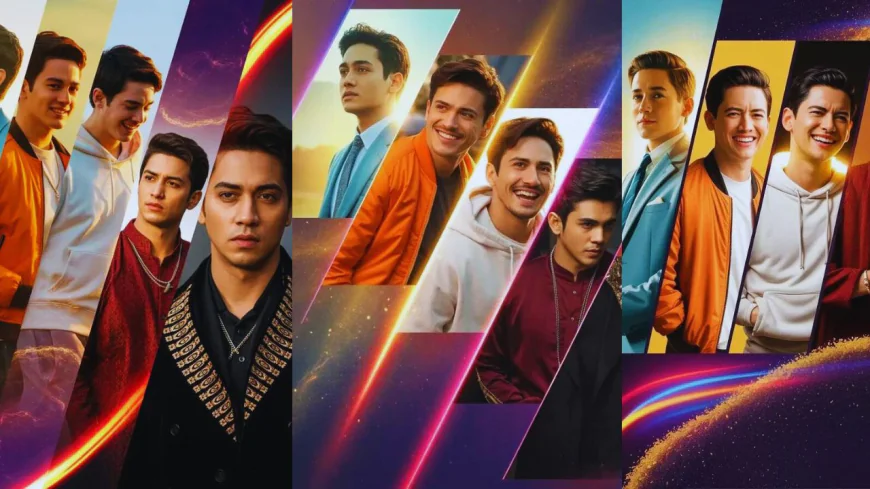
If you’ve ever wished you could design a stunning movie-style poster without learning complex tools or spending hours editing, AI image generators can make it happen. With just one well-written prompt, you can turn a simple idea into a professional-looking artwork. Let’s walk through a real example of how a single detailed prompt can help you generate an 8K ultra-realistic cinematic poster that feels alive and full of emotion.
The Power of a Detailed Prompt
When you tell an AI what to create, every word matters. A clear and descriptive prompt guides the AI to understand what you want — from colors and lighting to emotions and atmosphere. Think of it like giving a photographer step-by-step directions before a photoshoot.
Here’s the magic prompt we’re going to explore:
“8K ultra-realistic cinematic poster featuring five diagonal panels of the same young man, each capturing a different emotion, fashion style, and lighting mood — all designed to look natural yet strikingly cinematic. Calm: He wears a light sage-green utility jacket over a cream turtleneck, subtle jewelry glinting in warm sunlight, expression relaxed and centered. Smiling: Dressed in a cropped orange puffer jacket with a white graphic tee and silver chain, captured mid-laugh under soft golden light. Laughing: Wearing a cozy oversized white hoodie under a denim overshirt, glowing backlight creates a radiant, candid energy. Thoughtful: In a deep maroon corduroy shirt layered with a dark scarf and minimal silver pendant, expression quiet and introspective under moody crimson-blue lighting. Serious: Clad in a sleek black bomber jacket with gold embroidery and matte black accessories, face half-lit with cold directional light for a dramatic cinematic finish. The five panels cut diagonally across a textured cosmic gradient backdrop that shifts from violet to black, filled with floating golden dust, lens flares, and streaks of neon red, amber, and blue. Fine film grain, realistic shadows, and soft rim lighting add tactile realism. At the bottom, the glowing metallic gold logo reads ThePromptsEra.in, centered with cinematic symmetry.”
This may look long, but it’s what gives your image richness and clarity. Each sentence tells the AI something specific — what to draw, how to light it, what emotions to show, and how to arrange the composition.
Breaking Down the Prompt
Let’s simplify and understand how this prompt works:
-
Main Theme:
It starts with “8K ultra-realistic cinematic poster”. This tells the AI the quality and style — ultra-high resolution and movie-poster aesthetics. -
Panel Design:
“Five diagonal panels of the same young man” gives structure to the image. The diagonal layout adds creativity, while the repeated subject ensures harmony. -
Different Emotions and Styles:
Each panel shows a new version of the same person — calm, smiling, laughing, thoughtful, and serious. This adds variety while keeping the theme connected. -
Fashion and Lighting Details:
Each emotion is paired with specific outfits and lighting moods — from a warm, sunny glow to a cool, dramatic contrast. These small touches make the artwork cinematic and natural. -
Background and Effects:
“Cosmic gradient backdrop with golden dust, lens flares, and neon streaks” adds a dreamy, film-inspired texture. The colors — violet, black, red, amber, and blue — blend to make the scene visually rich. -
Finishing Touch:
The logo “ThePromptsEra” in glowing metallic gold ties the whole piece together, like a movie title at the bottom of a film poster.
Why It Works So Well
This prompt succeeds because it balances detail with clarity. It doesn’t just list random visual elements — it connects them emotionally. Each outfit and lighting tone reflects a mood, making the image feel like a story rather than a collage.
Also, the choice of words like “realistic shadows,” “soft rim lighting,” and “fine film grain” helps the AI understand you want natural texture, not overly glossy effects. This makes the final result believable, warm, and deeply cinematic.
Tips to Create Your Own Cinematic Prompt
If you want to design something similar, here are some easy steps:
-
Start with the mood or emotion you want to express.
-
Describe your subject — age, outfit, pose, or expression.
-
Add lighting and color — think about sunrise glow, city neon, or soft moonlight.
-
Mention the style — cinematic, portrait, fantasy, or editorial.
-
Include small artistic details like textures, reflections, or depth.
-
Finish with a backdrop or logo idea if you want a poster feel.
The key is to be descriptive but natural — like telling a story to a friend, not writing a code for a machine.
Final Thoughts
With this single prompt, you can create an AI-generated image that looks like it came straight out of a movie studio. It’s not just about having the right tool — it’s about using words that paint a picture. The more naturally you describe your idea, the more beautifully the AI will bring it to life.
So next time you want to make something cinematic, try writing your own version of this prompt — and watch your imagination turn into a stunning visual masterpiece.
What's Your Reaction?
 Like
0
Like
0
 Dislike
0
Dislike
0
 Love
2
Love
2
 Funny
0
Funny
0
 Angry
0
Angry
0
 Sad
0
Sad
0
 Wow
0
Wow
0

Related Posts
-
 Ritik SolankiThanks bro..this prompt is awesome.