










Transform Your Photo into a Beautiful Indian Woman with Gemini and Perplexity: Free Ultra-Realistic 8K Image Creation
Create a stunning ultra-realistic 8K image of a beautiful Indian woman using Gemini and Perplexity AI for free. Simple, fast, and elegant results!
-
Introduction
Have you ever imagined how your photo might look if it was transformed into a beautiful Indian woman in traditional attire? Sounds magical, right? Well, now you can make it happen — and it’s completely free!
AI tools like Gemini and Perplexity are changing the way we create art. They can take a normal photo and turn it into something ultra-realistic, detailed, and full of life — almost like a real photograph taken by a professional. The best part? You don’t need to be a designer, editor, or even tech-savvy to do it.
These tools are easy to use, fast, and most importantly — free! So if you’re ready to see your photo transformed into a beautiful Indian woman in glowing 8K quality, this guide is perfect for you.
-
The Magic of AI in Photo Transformation
AI is kind of like a digital artist with superpowers. It looks at your photo — your facial features, your smile, your expression — and reimagines it in a new artistic style while keeping “you” inside the image.
The amazing thing is that Gemini and Perplexity don’t just replace faces or randomly draw; they analyze the expression, the angles, and even the mood of your picture. Then, they recreate the same emotion in the transformed version.
So if your photo shows a calm smile, the AI keeps that gentle, natural look. If your picture has bright eyes and a happy grin, your transformed image will carry that same energy — only this time, you’ll appear as a beautifully dressed Indian woman in traditional attire.
That’s the real beauty of AI — it doesn’t just draw, it understands.
-
The Detailed Prompt Explained
To get the perfect transformation, you’ll use a carefully written prompt. This prompt tells the AI exactly what kind of image you want — from the style and colors to the background and lighting. Let’s break it down:
-
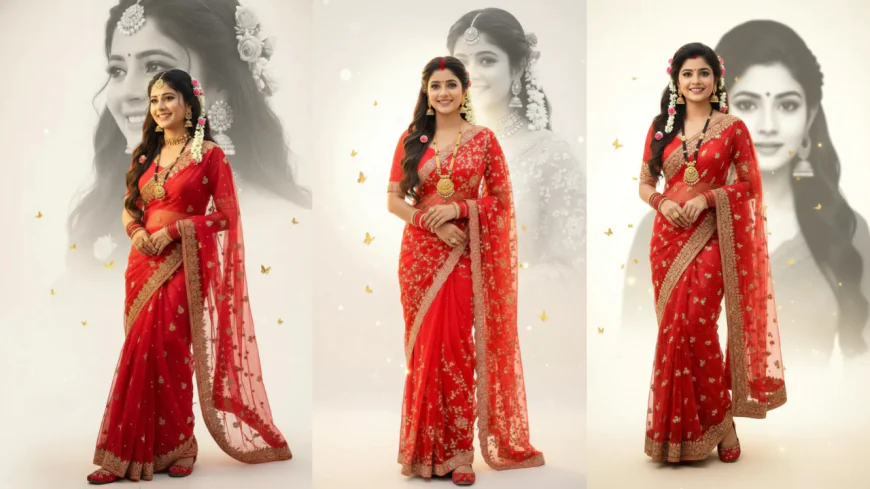
Ultra-realistic 8K quality: This ensures your final image looks sharp, clear, and rich in detail, almost like a professional photo shoot.
-
Traditional Indian attire: The woman will wear a red net sari, red blouse, red churi, and red jutti — a complete classic Indian look that glows with culture and grace.
-
Accessories: Details like mangalsutra, white gajra, sindur, and large ethnic earrings add a sense of authenticity and traditional beauty.
-
Artistic background: A black-and-white half face behind the main portrait gives a creative depth — it feels like a dream, something poetic.
-
Golden butterflies: Tiny golden butterflies fluttering in the background add magic and charm, giving the whole picture a soft, glowing motion.
-
Warm glowing ivory-white background: This background adds warmth and elegance. It helps the red colors and gold tones stand out beautifully.
Each of these details has a purpose. Together, they create a blend of tradition, grace, and artistic emotion — a piece that feels alive, not just digitally made.
-
-
The Image Generating Prompt
Here’s the exact prompt you’ll need. You can copy and paste this directly into Gemini when uploading your photo:
Prompt:
Ultra-realistic 8K photo of a beautiful Indian woman (use uploaded face, same expression), smiling, in red net sari, red blouse, red churi, red jutti, with mangalsutra, white gajra, sindur, and large ethnic earrings. Behind her, a black-and-white half face is slightly higher, softly blended with dreamy depth, tiny golden butterflies, on a warm glowing ivory-white background, realistic and elegant. Keep uploaded face in image with facial expressions.
This is the magic sentence that tells the AI exactly what to do. You can also use Perplexity to enhance or slightly modify the prompt — for example, if you want to make it look more cinematic, or add a golden glow around the subject.
-
Step-by-Step Guide to Using Gemini and Perplexity
Ready to start? Follow these steps and you’ll have your ultra-realistic image in minutes.
Step 1: Open Gemini AI on your browser (just search “Google Gemini”). Log in using your Google account.
Step 2: Once you’re inside, look for the upload image option. Upload the photo you want to transform — make sure it’s clear, well-lit, and your face is visible.
Step 3: Copy the prompt from above and paste it into the chat box below your uploaded photo.
Step 4: Hit enter! Gemini will take a few seconds to process everything. Sit back and watch the magic happen.
Step 5: Review the result. If the image looks slightly off or missing details, try rephrasing the prompt a little. You can also go to Perplexity and ask it to “refine this Gemini image prompt for a more elegant look.” Then, paste the improved version back into Gemini.
Step 6: Once satisfied, download your image in high quality. You now have your very own 8K ultra-realistic portrait!
💡 Tip: For best results, use a clear headshot with soft lighting and neutral expression — this helps the AI understand your facial details better.
-
Creative Uses for Your Transformed Image
Once you’ve got your stunning Indian woman transformation, there are so many ways you can use it:
-
🎨 Social media profile picture: Make your Instagram or WhatsApp DP stand out with your new artistic avatar.
-
💝 Personalized gifts: Print it on a mug, photo frame, or poster. It’s unique and personal.
-
🖼️ Digital artwork: Use it in your digital portfolio, blog, or AI art project.
-
📱 Storytelling: Combine it with text to make a creative short story or poem post.
The options are endless — it’s all about how you want to express yourself.
-
-
Why Gemini and Perplexity?
Both tools are free, simple, and surprisingly powerful.
-
Gemini focuses on image generation and editing — it understands prompts very well.
-
Perplexity helps you improve your prompts with better clarity and creativity.
Together, they make a perfect combo for anyone who wants to explore the world of AI visuals without spending money.
-
-
Conclusion
AI has made it possible for anyone to create art that looks straight out of a fantasy world. You don’t need expensive software or fancy editing skills — just your photo, a prompt, and a bit of curiosity.
With Gemini and Perplexity, you can transform yourself into a stunning, ultra-realistic Indian woman with vibrant details, glowing tones, and cultural elegance — all in a few clicks.
So go ahead and try it! Upload your photo, paste the prompt, and see the magic unfold.
And if you love your result, share it with your friends — who knows, they might want their own dreamy transformation too! ✨
What's Your Reaction?
 Like
0
Like
0
 Dislike
0
Dislike
0
 Love
0
Love
0
 Funny
0
Funny
0
 Angry
0
Angry
0
 Sad
0
Sad
0
 Wow
0
Wow
0