






Sora Launches on Android – Here's Everything You Need to Know About AI Video Creation
Sora, OpenAI’s AI video generator, is now available on Android! Learn about its features, pricing, safety updates, and how to create stunning short videos using just text.
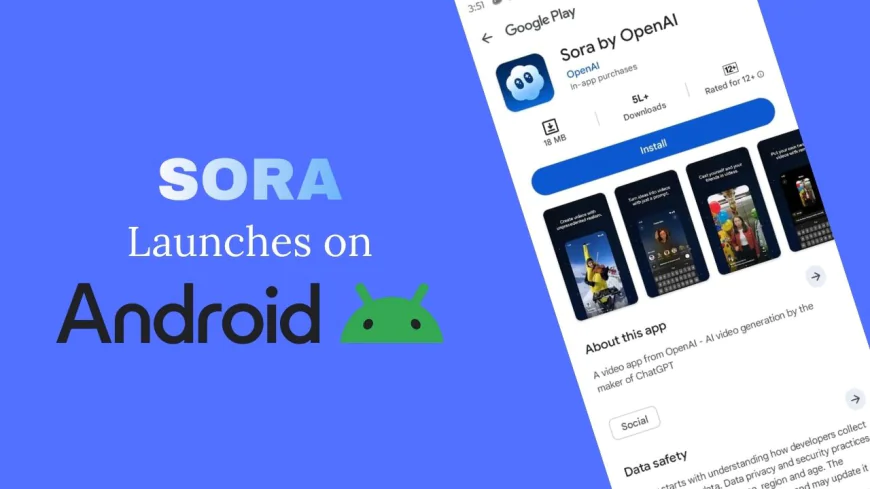
Table of Contents
- Introduction
- What is Sora?
- Sora Now Available on Android: The Details
- Key Features You Can Access on Android
- Pricing & Subscription Plans
- How to Download and Get Started
- Safety, Moderation & Ethical Considerations
- Sora vs. Competitors
- Current Limitations & What’s Coming Next
- Is Sora Right for You?
- Tips for Creating Better Sora Videos
- Conclusion
-
Introduction
Guess what? Sora, the super popular AI video app made by OpenAI, has finally arrived on Android! 🎉
If you’ve been watching all the fun people were having on iPhones, it’s your turn now. This is a big deal because Android users make up a huge part of the mobile world. And now, they can join the AI video craze too.
Sora’s iOS version already blew up the internet — it got 1 million downloads in just 5 days! Crazy, right?
In this article, we’ll go over what Sora actually is, what cool stuff it can do, how to get it on your phone, and some tips to make your videos look awesome. So, let’s dive right in.
-
What is Sora?
Sora is basically an AI video creator made by OpenAI, the same team behind ChatGPT.
It uses a new model called Sora 2, which is smarter, faster, and more realistic than before. You just type a short sentence, like “a cat skateboarding in space”, and boom — it creates a short video clip that looks surprisingly real.
Unlike traditional video editors, you don’t need fancy cameras, editing skills, or even actors. Sora handles it all for you.
This tool is changing the way short-form videos are made. Whether it’s memes, YouTube Shorts, or ads — you can make everything with just words. It’s like having a movie studio inside your phone!
-
Sora Now Available on Android: The Details
The official Android launch date was November 4, 2025 — so yes, it’s fresh and new!
For now, it’s available in the US, Canada, Japan, South Korea, Taiwan, Thailand, and Vietnam. More countries are expected soon (we’ll talk about India later 👀).
You can download it from the Google Play Store, and the best part — no invite code needed (for a limited time).
The Android version looks a lot like the iOS app, but it’s optimized for different screen sizes and devices. Some features might come later, but overall, you’re not missing much.
-
Key Features You Can Access on Android
Sora is loaded with fun and creative tools. Here’s a quick list of what you can do:
-
Text-to-Video: Type anything, and it’ll make a short video.
-
Cameos: Add yourself, your friends, or even your pets into videos using face and voice recognition.
-
Editing Tools: Cut, trim, or combine clips easily — no editing degree needed.
-
Remix Function: Take an existing video and create a new version with your own twist.
-
Social Feed: Scroll through other people’s videos like on TikTok. You can like, share, and follow creators.
-
Storyboarding: (For Pro users) Plan your video scenes before you start.
-
Multiple Styles: Choose between cinematic, cartoon, realistic, or stylized looks.
Basically, Sora lets you become a director, editor, and actor all in one.
-
-
Pricing & Subscription Plans
Sora is free to start, but it also offers paid options for people who want to create more videos.
Here’s the breakdown:
-
Free plan: 30 videos per day.
-
ChatGPT Plus users: Also 30 videos per day.
-
ChatGPT Pro subscribers: 100 videos per day.
-
Extra tokens: $4 for 10 more videos.
OpenAI says the reason behind paid options is because creating AI videos uses a lot of computing power. They need to balance quality and server load — makes sense!
-
-
How to Download and Get Started
Here’s how you can start your Sora journey:
-
Open Google Play Store and search for “Sora by OpenAI”.
-
Tap Install.
-
Open the app and sign in using your OpenAI account (or create one).
-
Set up your profile — you can pick your interests, add a bio, and link your socials.
-
Type your first prompt (like “a funny robot dancing on the beach”) and hit Generate.
For younger users, Sora automatically adjusts content filters. That means no inappropriate stuff sneaks through. 👍
-
-
Safety, Moderation & Ethical Considerations
OpenAI has worked hard to keep Sora safe.
They’ve changed the system from “opt-out” to “opt-in” for copyrighted materials — meaning creators have to give permission before their work is used in training.
Sora also includes teen protection features, like stricter moderation for users under 18.
You can even revoke access to your likeness if you don’t want your face or voice to appear in AI videos.
Another big move — OpenAI has partnered with SAG-AFTRA, the actor’s union, to make sure AI content respects real artists’ rights.
Still, people have concerns about deepfakes and misuse, which OpenAI says they’re monitoring closely.
-
Sora vs. Competitors
There are other AI video tools around, like Meta’s Vibes and Google’s VideoFX, but Sora feels more polished.
Vibes focuses on fun social clips, and VideoFX aims at creators who want realism. But Sora combines both — it’s powerful and user-friendly.
That’s why it became an instant hit. Its videos just look smoother and more natural, and the text-to-video results are crazy good compared to others.
-
Current Limitations & What’s Coming Next
Sora’s not perfect yet. Here are some current limits:
-
Not available in India or Europe yet (but OpenAI says soon).
-
Video length is capped at 15 seconds for free and Plus users, and 35 seconds for Pro users on web.
-
Some advanced tools like multi-scene editing are still in testing.
The future roadmap includes expanding to Europe, adding more styles, and even launching monetization options — so creators could earn money from their videos!
-
-
Is Sora Right for You?
You’ll probably love Sora if you’re:
-
A content creator or YouTuber who wants quick visuals.
-
A marketer who needs promo videos fast.
-
A teacher or student making educational clips.
-
Or just someone who wants to have fun and try cool ideas.
Even businesses are starting to use it for explainer videos and product demos. Basically, if you can type, you can create!
-
-
Tips for Creating Better Sora Videos
Here are a few tips to make your videos stand out:
-
Be specific in your text prompt — “a happy dog running in the park during sunset” works better than “a dog video.”
-
Use Cameos creatively — maybe add yourself into a famous movie scene!
-
Remix viral content — add your spin to trending clips.
-
Keep it short — short clips load faster and perform better.
-
Plan ahead if you’re a Pro user — use the storyboarding tool to save time.
And don’t forget to experiment. The more you play with it, the better you’ll get.
-
-
Conclusion
The launch of Sora on Android isn’t just another app release — it’s a big step for AI video creation everywhere.
Now millions more people can explore storytelling in a whole new way, without needing fancy gear or editing skills.
If you’ve ever wanted to make your ideas come alive on screen, now’s the time to try Sora.
Go to the Google Play Store, download it, and start experimenting. You might be surprised by what you can create.
AI video creation is still new, but it’s growing fast — and Sora is leading that journey.
So, what will you create first? Let me know in the comments below 👇
What's Your Reaction?
 Like
0
Like
0
 Dislike
0
Dislike
0
 Love
0
Love
0
 Funny
0
Funny
0
 Angry
0
Angry
0
 Sad
0
Sad
0
 Wow
0
Wow
0