







Best Prompt to Create Dreamy AI Portrait Using Perplexity AI
Learn how to create a dreamy, lifelike AI portrait using Perplexity AI. This easy guide explains the perfect prompt, image setup, and small tricks to get that soft, cinematic look everyone loves online. No fancy tools needed—just your selfie photo, words and a bit of imagination!

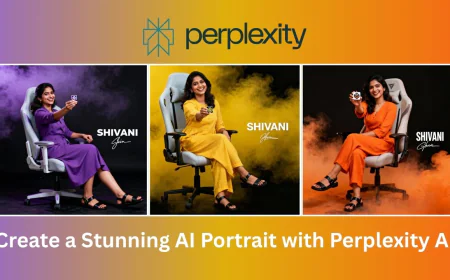
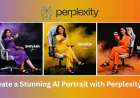
If you’ve ever scrolled through Instagram or Pinterest lately, you might’ve noticed how AI portraits are taking over the internet. They look super realistic, creative, and sometimes even better than normal photos. And guess what? You don’t have to be a designer or photographer to make them. With tools like Perplexity AI, creating trending AI portraits is easier (and way more fun) than it sounds.
Let’s talk about how you can make one — and I’ll even share a beautiful example prompt you can use.
What’s a Trending AI Portrait?
An AI portrait is basically an image of a person created using artificial intelligence. You describe what you want to see — like how the person looks, what they’re wearing, what the background should be, and even what kind of mood or lighting you want — and the AI turns your words into a picture. You can apply this in your own photo as well.
These portraits look so realistic that many people use them for profile photos, posters, or creative projects. The secret lies in writing a good prompt, which is just a detailed sentence that tells the AI what you want it to draw.
Example Prompt (That Actually Works)
Here’s a prompt you can try:
"A young South Asian woman is seated on a decorative hanging chair, slightly left of center, facing the viewer with a gentle smile. She appears to be in her late 20s or early 30s. She wears a light white blouse with a plunging neckline and a white saree, elegantly draped over her legs. Her dark, wavy hair cascades over her shoulders. She wears small gold earrings. The chair is adorned with fairy lights and white flowers, which illuminate the background bamboo fencing. The lighting is soft and flattering, creating a warm, inviting atmosphere. The composition is well-balanced, emphasizing the woman and her elegant attire in a relaxed setting. The face matches 100% with the attached image."
Now, that’s quite a mouthful — but every little detail helps. When you include things like lighting, outfit, background, and pose, the AI understands your vision better.
Why This Prompt Works So Well
This prompt stands out because it balances realism and style. The woman’s description — her outfit, posture, and gentle smile — gives a calm and graceful vibe. The fairy lights and white flowers add a warm, dreamy touch that makes the photo look perfect for Instagram.
Soft lighting and a well-balanced background help the portrait feel professional, almost like it was shot in a cozy café or garden studio. It’s the kind of image that feels both elegant and peaceful at the same time.
If you’ve ever seen those calming portraits with warm light and soft colors that make you stop scrolling for a second — yeah, that’s the effect we’re going for here.
How to Generate This with Perplexity AI
Perplexity AI isn’t just for searching — it can also help you create or refine prompts for AI art tools like Midjourney, Leonardo, or Ideogram. Here’s how you can do it step by step:
- Go to Perplexity AI — Just open perplexity.ai.
- Type something like: “Write a realistic AI portrait prompt for a South Asian woman in a hanging chair with soft lighting.”
- Refine your prompt — Perplexity will give you ideas. You can edit them or combine parts you like.
- Copy and paste your final prompt into your favorite AI image generator.
- Adjust details — If you don’t like something in the output, just tweak the prompt a little. Maybe change lighting or color tone until it feels perfect.
Perplexity makes it easier because it helps you think of the right words. Sometimes you might know what you want in your head, but not how to describe it — that’s where AI tools like this come in handy.
The Magic of AI Portraits
Once your image is generated, you’ll be amazed. It’s like seeing your imagination come alive. You can use these portraits for profile pictures, creative edits, story covers, or just to post something beautiful online.
And the best part? You can do it all by yourself — no fancy camera, no photographer, just creativity and the right prompt.
Final Thoughts
Creating trending AI portraits with Perplexity AI is all about imagination and words. The more clearly you describe your vision, the better your portrait will turn out.
So next time you see a viral AI photo online, remember — you can make one too! Just take a little time to write your prompt carefully, try out different styles, and let the AI do the magic.
Trust me, once you start, you won’t wanna stop experimenting. It’s creative, relaxing, and super fun — and who knows, your next AI portrait might just be the next trending post everyone’s talking about!
What's Your Reaction?
 Like
0
Like
0
 Dislike
0
Dislike
0
 Love
1
Love
1
 Funny
0
Funny
0
 Angry
0
Angry
0
 Sad
0
Sad
0
 Wow
0
Wow
0